
Hello. How may we help you?
-
Getting Started
- Configuring Your Management Module
- Create & Configure A New Organization
- Creating a Customized Address
- Mastering Advanced Search and Filters
- Understanding Your Organization's Homepage
- Understanding Role Function
- Dashboard Overview: Key Insights for Organizational Decision-Making
- Changing The Language
- Changing Your Password
- Editing Your Profile
- Feedback and Requests
- Frontier.cool Privacy Policy
- Managing Your Profile Menu
- How to Activate Two-step Verification
- Are all of my digital fabrics shared publicly?
- Does Frontier.cool’s TextileCloud™ offers a free trial plan?
- How do I change the language?
- How do I send feedback or make a request?
- How does Frontier.cool protect my privacy and keep my data secure?
- How does Frontier.cool’s TextileCloud™ accurately generate physical properties?
- How does Frontier.cool’s TextileCloud™ generates accurate texture maps?
- Why can't I download other people's 3D material files?
- Why is my asset upload unsuccessful or canceled?
- How does Frontier.cool’s TextileCloud™ generates environmental impact data with Eco-Impactor™?
- Accessing and Copying a Shared Collection
- Adding Assets to Collection in the Workspace
- Creating and Accessing Collections
- Creating and Managing a Private Digital Library on an Embed Page
- Managing Collections
- Managing Your Workspace
- Sharing Assets and Collections
- Edit Your Collection’s Cover Image
- Reach Out via Email: Enhance Engagement Through Shared Collections
- Attaching Files to Support Asset Information
- Copying Assets To Group or Workspace
- Creating 3D Materials
- Creating 3D Materials for Fabrics with Mesh
- Creating Assets
- Creating Assets by Smart Upload
- Creating Assets with APEXFiz File
- Creating Assets with Multiple Fabric Sides
- Customizing Asset’s Cover Image
- Deleting Assets
- Digital Drape Overview
- Downloading 3D Material Files
- Editing An Asset
- Exploring the 3D Viewer
- Export Digital Library Data to Excel
- Importing TextileCloud™'s 3D Material Files Into CLO3D
- Integrate Your System With TextileCloud™ Using APIs (Application Programming Interfaces)
- Mass Data Update and Management
- Mass Upload Data
- Mass Upload Data with Multiple Fabric Sides
- Merge Material for Asset with Face and Back Side
- Navigating the Asset Library on Frontier.cool
- Printing an Asset
- Printing and Customizing Your QR Code Label
- TextileCloud™'s Supported 3D Material Files
- The Asset Library
- Understanding Texture Maps
- Updating Fabric Images with QR Code Labels
- Uploading Pre-Scanned Images
- Best Practices for Filling Mass Upload's Excel Template
- Frontier.cool's Fabric Physical Properties
- Unlock the Power of Eco-Impactor®
- Image Search in Asset Library
- Best Practice to Mass Upload Data and Auto-Update Fabric Images
- Discover Assets Smarter with AI Search
- Exploring the Key Features of the Thread Board on Frontier.cool
- Navigating Detailed Card Information in the Thread Board Module on Frontier.cool
- Navigating the Thread Board Module in Frontier.cool
- Start a DigitalThread™ Conversation
- Accessing Detailed Fabric Information on Frontier.cool
- Accessing Trade Events and Vendors on Frontier.cool
- Exploring the Sourcing Library Module on Frontier.cool
- Fabric Discovery and Information in the Frontier.cool Sourcing Library
- Transforming Material Sourcing with FabriSelect™
- Creating and Sharing Collection in Fabriselect™
- How to Sign Up and Log In to Fabriselect™
- How to Add Meeting Minutes in FabriSelect™
- Discover the Dashboard in FabriSelect™
- Scan, Save, and Explore with FabriSelect™
- Creating and Managing Custom Sections and Fields
- How to Fill In Custom Sections and Fields
- Managing Dropdown Options in Custom Fields
-
開始使用
個人資料管理
團隊相關
工作區相關
- 建立與存取資料夾
- 將布料新增至工作區的資料夾中
- 分享布料與資料夾
- 管理您的工作區
- 管理工作區中的資料夾
- 在嵌入頁面上建立與管理數位圖書館
- 存取與複製與我分享的資料夾
- 自訂資料夾的封面圖片
- 通過電子郵件聯繫:透過分享資料夾提升互動參與度
- 使用應用程式介面 (API) 將您的系統連接至 TextileCloud™
- 探索布料資產模組
- 如何操作布料資產模組
- 如何建立布料
- 如何使用智慧上傳建立布料
- 如何用上傳已預掃描影像建立布料
- 使用 APEXFiz 檔案建立數位資產
- 了解TextileCloud™所支援的 3D 布料檔案
- 如何建立3D布料
- 如何下載3D布料以供設計或生產流程所需
- 建立網格布料的3D Material
- 編輯您的數位布料
- 自訂布料資產的封面圖像
- 如何列印布料資產的Swatch
- 將布料資產複製到團隊或工作區
- 批量上傳 : 快速建立大量布料流程介紹
- 批量管理:大量更新布料資訊介紹
- 了解紋理貼圖(6 Texture Maps)
- Digital Drape概覽
- 如何列印與客製布料的 QR Code 標籤
- 如何建立雙面或三層數位布料
- 時尚與紡織產業的永續轉型工具: Eco-Impactor®
- 如何刪除布料
- 探索3D檢視器: 布料採購、行銷和設計不可或缺的工具
- 如何使用QR Code標籤更新您的布料資訊
- 如何將TextileCloud™的3D布料檔案導入CLO3D
- 批量上傳 : 上傳雙面或多層布料說明
- 如何將正面布與背面布合併成雙面布
- 如何為布料新增附件使其資訊更為完整
- 如何將數位布料匯出成Excel檔
- Frontier.cool的布料物理數據介紹
- 如何填寫批量上傳的Excel模板
- 布料資產以圖搜圖功能
- 探索Frontier.cool的Sourcing Library 模組
- 探索Sourcing Library中的布料與相關資訊
- 了解Sourcing Library中布料的詳細資訊
- 了解Sourcing Library中的展會展示功能
- 如何註冊並登入 FabriSelect™
- 數位化您的布料採購流程-FabriSelect™
- 探索FabriSelect™ 的儀表板
- 如何使用FabriSelect™
- 如何用FabriSelect™ 建立和分享資料夾
- 如何在FabriSelect™ 建立會議記錄
- 如何更改語言設定
- 如何提交意見反饋或請求
- 管理數位布料的隱私與共享設定
- 資產上傳失敗或被取消的原因
- Frontier.cool會如何保障我的個人資料和數據
- Frontier.cool 如何透過 Eco-Impactor™ 精確生成環境影響數據?
- Frontier.cool是否有提供TextileCloud™的免費試用呢?
- Frontier.cool的TextileCloud™是如何精確地生成布料的物理數據的呢?
- 為何我無法下載與我分享的布料之3D檔案
Configuring Feature Setting
Introduction
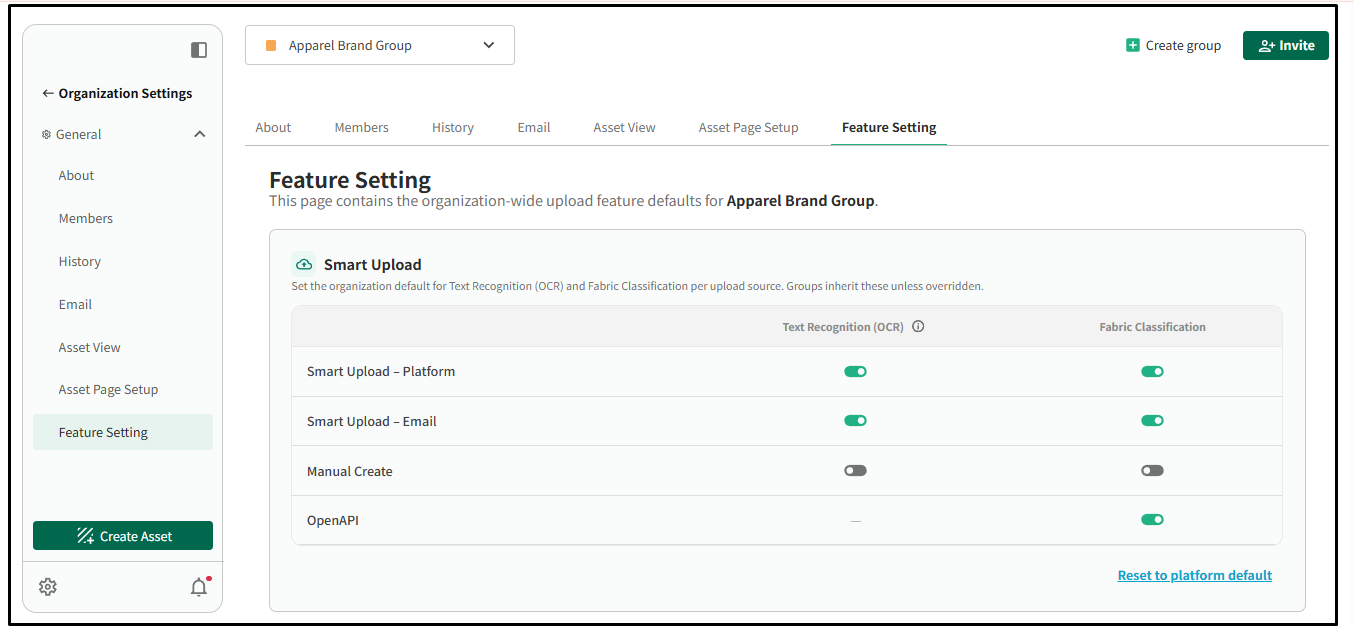
The Feature Settings page lets organization administrators configure the default upload features for the entire organization.
You can enable or disable:
- Text Recognition (OCR) – Automatically extracts text from uploaded material labels.
- Fabric Classification – Automatically identifies fabric attributes using AI.
These settings can be configured for each upload source:
- Smart Upload (Platform)
- Smart Upload (Email)
- Manual Create
- OpenAPI
Note: These are organization-wide default settings. Groups will inherit these defaults unless they have their own override.
Step by Step: How to Configure Feature Settings
- Go to Settings.
- Click your Organization Name, then select Organization Settings.
- Open the Feature Settings tab.
- For each upload source, toggle Text Recognition (OCR) and/or Fabric Classification On or Off as needed.
- Your changes will be saved as the default settings for your organization. However, if a group has its own Feature Settings configured, those group-specific settings will take priority instead.
Conclusion
Feature Settings allow your organization to define the default behavior for Text Recognition (OCR) and Fabric Classification across different upload methods, helping ensure a consistent upload experience for all users.
If you need any assistance configuring these settings or have any questions, please contact our support team at support@frontier.cool.
Store locator
-
Heading
Add address
-
Heading
Add address
-
Heading
Add address
Example product title
Size
Color
Quantity